Tag Groups
Tag Group Overview
A tag group is an instruction set for the M250 Reader and Zone Manager to tune the radio to listen for a specific type and set of RF Code Active tags. RF Code has produced hundreds of different active tags throughout the years and each type has its own method of encoding its data in its beacons. A tag group configured in CenterScape informs Zone Manager how to decode a tag type’s data and provides data to each M250 reader as to how to identify and decode the RF Signatures of beacons from a set of tags. Without tag groups, readers cannot identify RF Code tags from ambient RF noise received.
Managing Tag Groups
Each tag that RF Code produces has a Group Code and a Treatment Code printed on the label. Before a new type or set of tags can be used with CenterScape, the “tag group” must be added to CenterScape. In the following image an R156 temperature and humidity sensor is used to demonstrate how this information appears on the label of the tag. Other types of tags will be similar.
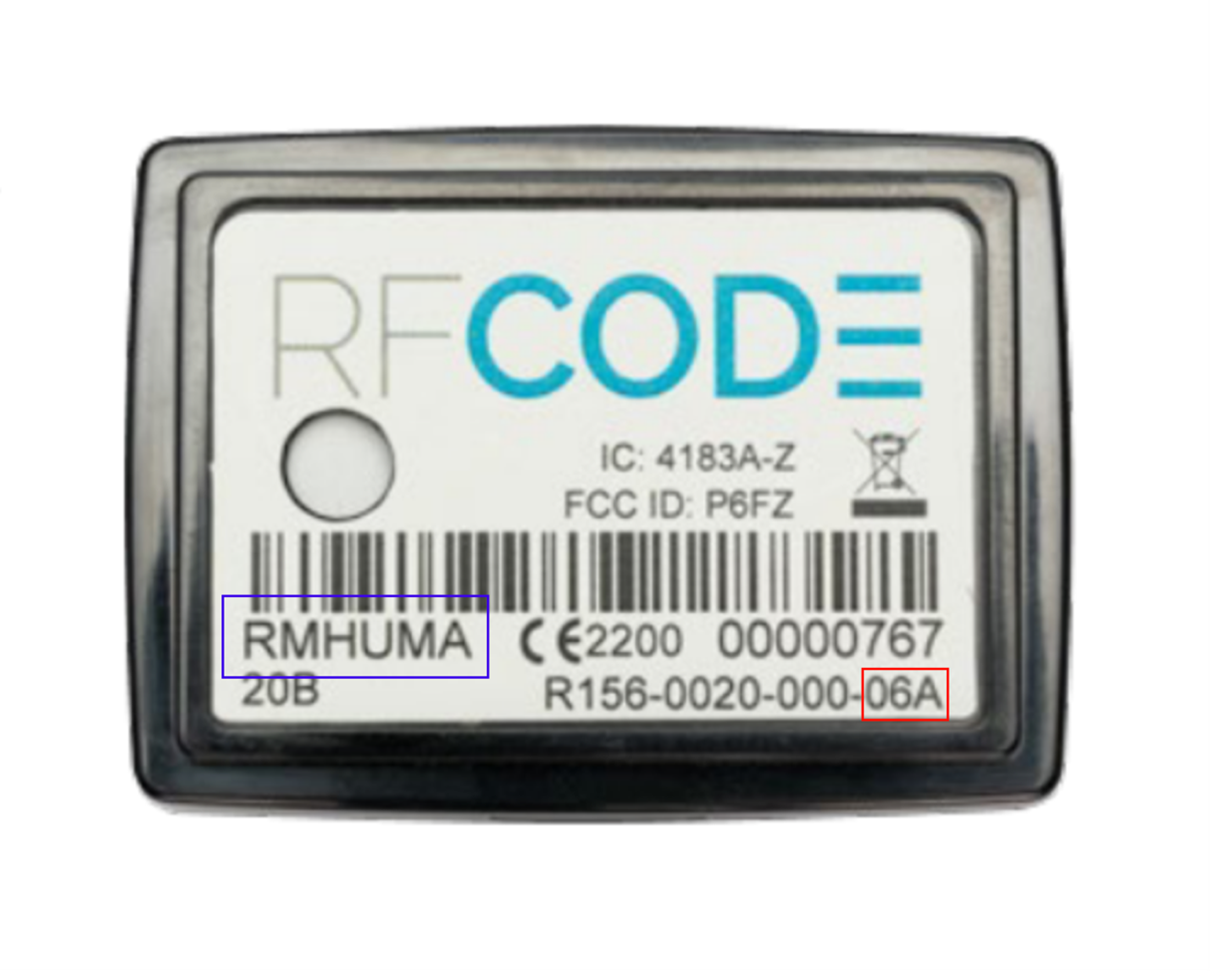
The blue box is the six character Group Code of the sensor. This is the information for the “set” of tags. The red box is the Treatment Code of the tag and is the instruction set on how to evaluate information from the tag. Some high volume treatment codes can have multiple group codes, but most treatment codes only have one corresponding group code. Adding the group code is done in the Administration Console under menu Configuration-> Tag Groups. Select from the drop down Tag Group the correct treatment which for this sensor is Treatment 06A.
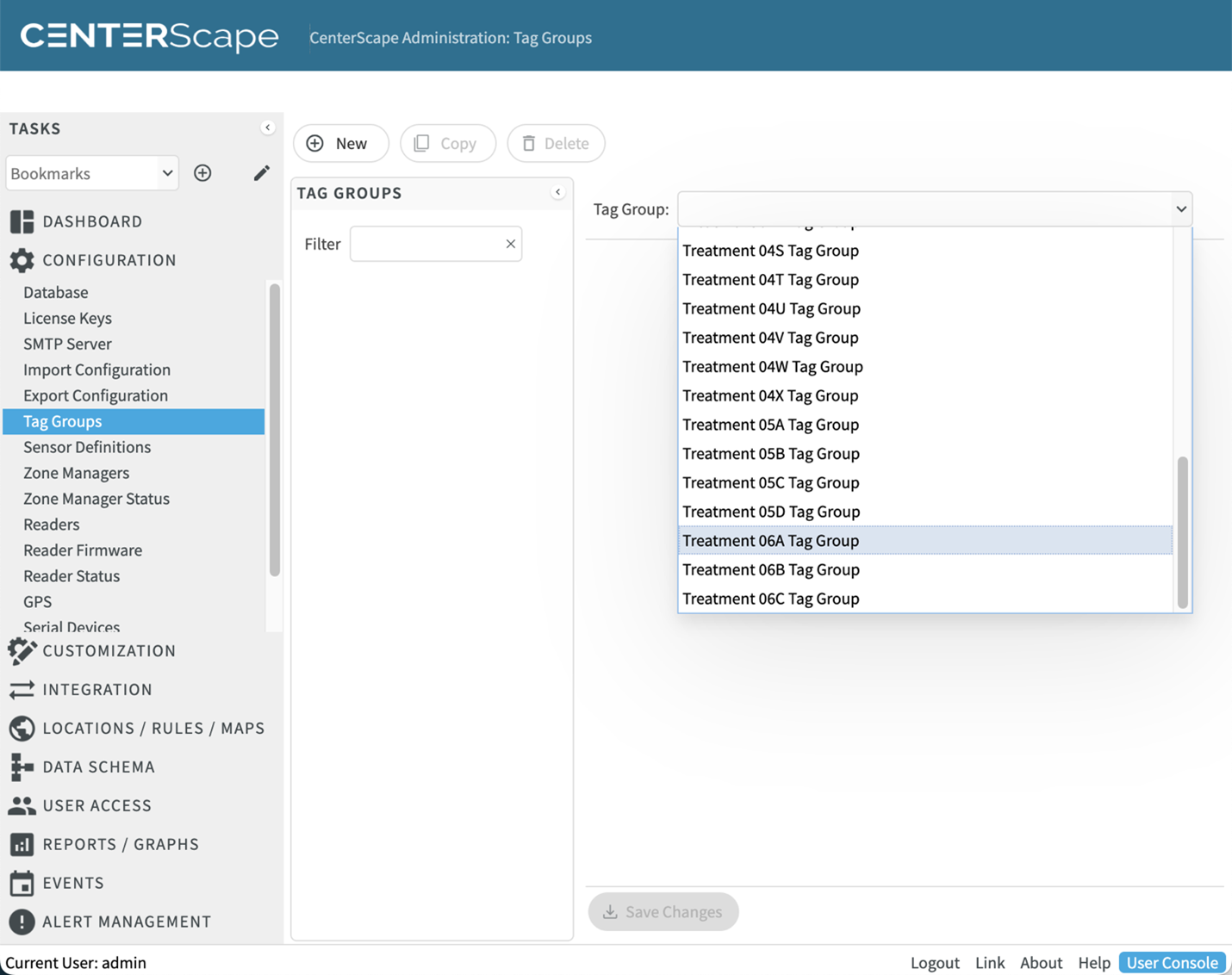
When selected a name must be added to the tag group which can be changed later if needed. This name is used simply to list the tag groups configured and can be anything. The other option fields will be prefilled out with RF Code’s best practices for that particular treatment code. It is not recommended that changes be made unless required later. The defaults for each treatment code are based on experience gained through testing and customer deployments. Occasionally RF Code will adjust the defaults of attributes for a group code when new insight is gained, but this will not alter group codes all already added.
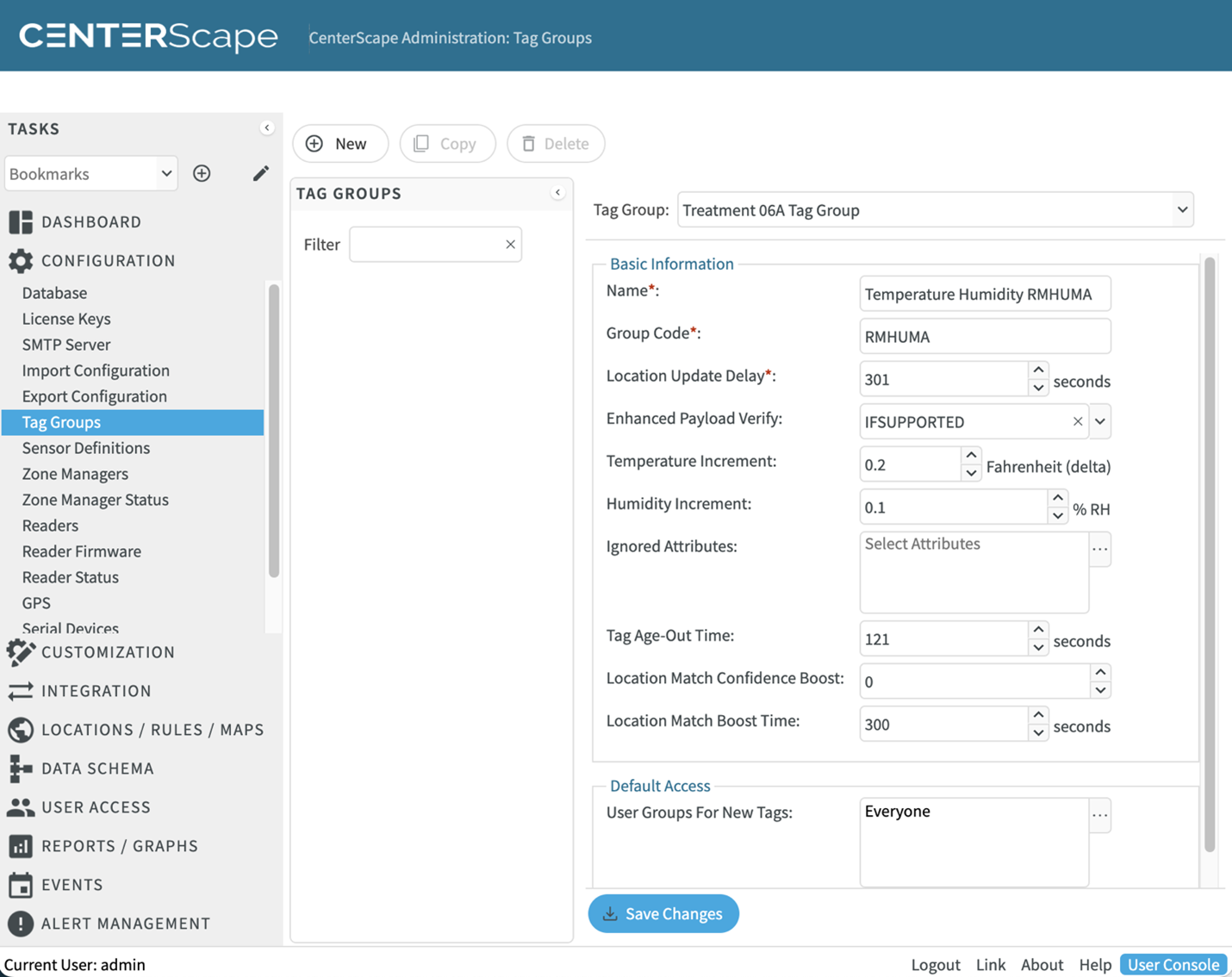
Most tag group configuration attributes are common across all treatment codes, but some tag group configuration attributes will vary based on the capabilities of the treatment code. In this case Temperature Increment and Humidity Increment are available as Treatment 06A is the instruction set for temperature and humidity sensors. The following describes the function of various attributes for Tag Groups.
| Attribute Name | Product Application | Description |
|---|---|---|
| Name | ALL | User Provided name used to manage the tag group. Use either group code or description of tag type. |
| Group Code | ALL | Six Capital Alphabet characters indicating the set of tags. By default the first Group Code produced for every treatment code will be displayed, but this may need to be changed for high volume tag types or custom group codes. |
| Location Update Delay | ALL | Used to delay location changes by a number of seconds to see if tag returns to previous location. This helps prevent occasional location jitter when RF is received temporarily better on a reader than the one closest to the tag. The IR rule can bypass this delay. |
| Enhanced Payload Verify | ALL | Used to preform multiple observations to verify corrupt payload reads by looks at other readers for multiple successful reads of the same beacon. |
| Ignored Attributes | ALL | Suppresses the reporting of an attribute the tag reports. For example, Humidity can be suppressed if only Temperature is required. |
| Tag Age-Out Time | ALL | The number of seconds that must past without a reader reporting a beacon from a tag before the reader reports that it no longer observes a tag. A setting of -1 will use the reader settings. |
| Location Match Confidence Boost | ALL | The longer a tag is detected in the same location the more confidence will be applied to a matching rule making the tag more “sticky” to the location. This is the amount of boost that is added to the rule logic. |
| Location Match Boost Time | ALL | The interval that each round of boost is added. A portion of Location Match Confidence boost will be added at each interval that a tag is continuously location in the same location. |
| Temperature Increment | All Temperature Sensors | This setting increases the amount of change in temperature needed before reporting a new value. Used to reduce the amount of data collected and processed. |
| Humidity Increment | All Temperature and Humidity Sensors | This setting increases the amount of change in humidity needed before reporting a new value. Used to reduce the amount of data collected and processed. |
| No Readings When Battery Low | Early Generation Temperature Sensors (04D, 04V) | When battery is low this null the temperature field due to unreliable data when battery is low. |
| PDU Asset Types | Rack PDU Sensors | Maps discovered PDU components to corresponding asset types. |
| Pressure Increment | R160 Differential Pressure Sensor | Determines the amount of change needed in pressure before updating last reading. Used to lower data collection by ignoring minor changes in pressure. |
| Current Reading Increment | 0-20 mA sensor | Determines the amount of change needed in hundredths of milliamps of monitored current before updating last reading. Used to lower data collection by ignoring minor changes in milliamps which translates to more stable readings for lower precision third party instruments. |
| Voltage Reading Increment | 0 -5 Volt Sensor | Determines the amount of change needed in thousandths of volts in monitored current before updating last reading. Used to lower data collection by ignoring minor changes in voltage which translates to more stable readings for lower precision third party instruments. |